
The terminal
The token page
One page per token, with its chart, live trades, largest holders and your own position. Your wallets are marked in your browser; the server never learns them.
This page is in English.
On this page
Open it
Tap a card's body on the terminal, or press Enter with the pointer over a card. You can also open app.usewisp.trade/#token/ followed by a mint address. ← Board or Esc takes you back.
What the page shows
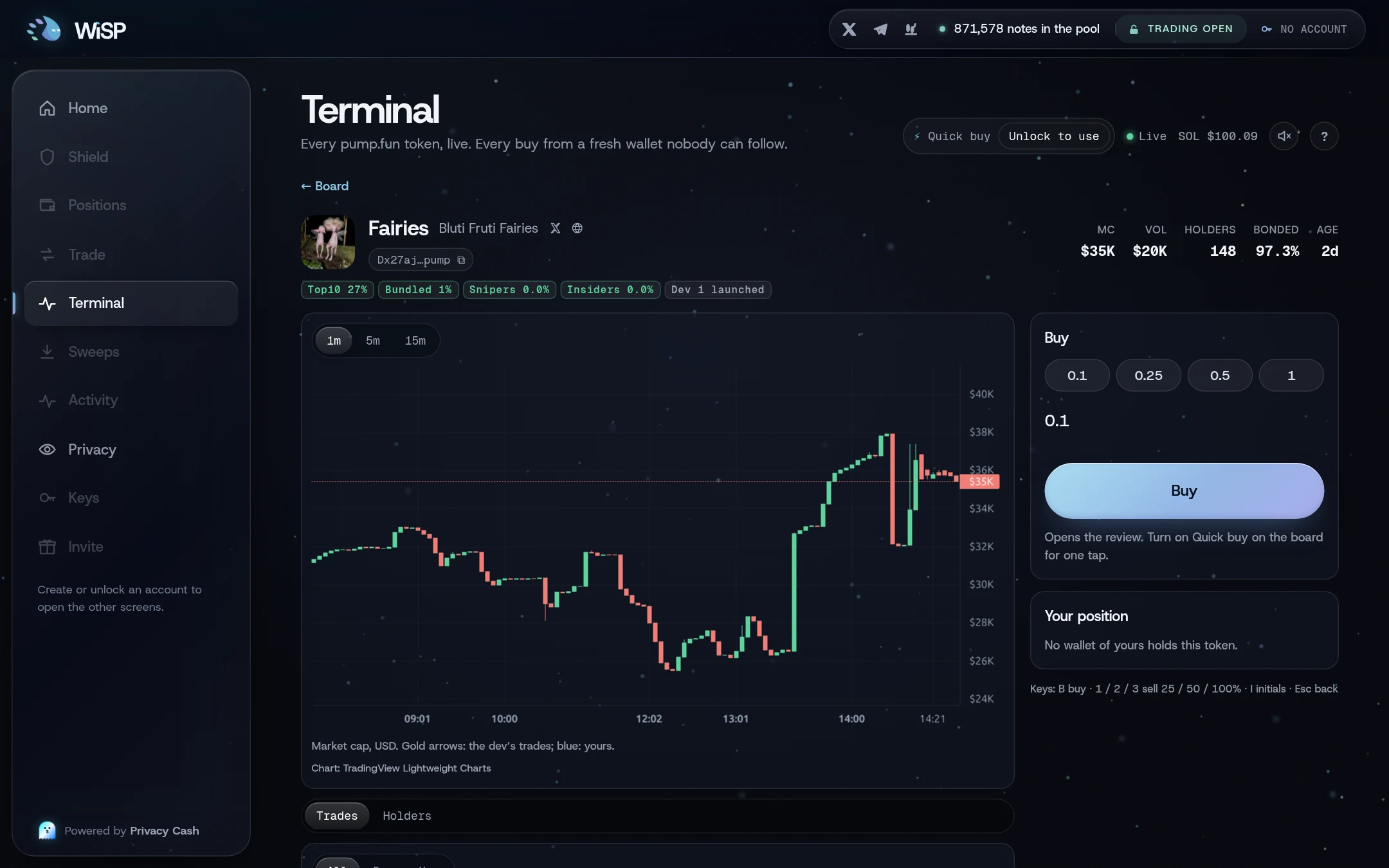
Header. Icon, ticker, name and social links. A button with the short address copies the mint ("Token address copied."). Then MC, Vol, Holders, Bonded with the curve's percentage (or Migrated and how long ago), and Age. Below: chips for the top 10 share, the dev's share, the risk chips and the dev's launches. When the early-wallet risk could not be read, an Early wallets unknown chip stands in for the three risk chips: treat the token as unchecked.
Chart. Market cap in USD, with 1m, 5m and 15m candles. Gold arrows mark the dev's trades; blue marks yours. When a token is too new, the chart says "No candles yet: the chart starts with the first trades WiSP sees."
Trades. The latest 100 trades with their age, side, SOL, market cap and wallet. Filter with All, Dev or You.
Holders. The 20 largest token accounts, with their share of a billion tokens and a label where one applies: Dev, Bundled, Sniper, Insider, Pool (the curve or the pool) or You.
How "You" is marked
The diagram in words
WiSP's server sends the chart, the trades and the holders. This is public chain data, the same for every viewer. Your browser holds your wallet list, from your encrypted account. It compares the two and marks the rows that match as You, in the trades, the holders and the chart. Your wallets are never sent to the server.
Your position
When one of your wallets holds the token, Your position shows Wallet, Holds, Worth, Bought, Sold (if any), P&L in SOL and percent, and SOL in the wallet. Otherwise it reads "No wallet of yours holds this token."
Buy or add
The buy box offers 0.1, 0.25, 0.5 and 1 SOL, or type an amount. Its button reads Buy, or Add when you hold the token.
- With Quick buy on, it goes at once from a fresh ready wallet, or adds to yours.
- With Quick buy off, it opens the review on Trade.
The note under the box says which, and it changes as soon as you switch Quick buy on or off on the board. Once a Quick buy session's buys are used, Buy opens the review again.
Sell, and sell initials
Sell 25%, Sell 50% and Sell 100% sell that share of your position, at once with Quick buy on or through the review without it.
Sell initials sells about the share that gives back the SOL your buys of this token cost, less what earlier sales already returned, so what stays in the wallet is already paid for. It counts the buys only, not the pool fee paid to fund the wallet. It sizes the sale with a 10% margin for the fee, price impact and slippage, so it may sell a little more than that.
- When selling everything would not give that back, after the margin, the button reads Initials: below cost and is greyed out.
- When earlier sales already returned what the buys cost, it is greyed out with the note "Nothing left to take out".
Keys: B buy or add, 1 2 3 sell 25, 50 or 100%, I sell initials, Esc back. See Sounds and hotkeys.
Related
Last checked against the app: 24 October 2026, build bf09a3f