
Trading
Sell all or part of a position
Sell 25, 50, 75 or 100% of what a wallet holds. A partial sale keeps the SOL in the wallet; a full sale sends it back to the pool.
This page is in English.
Steps
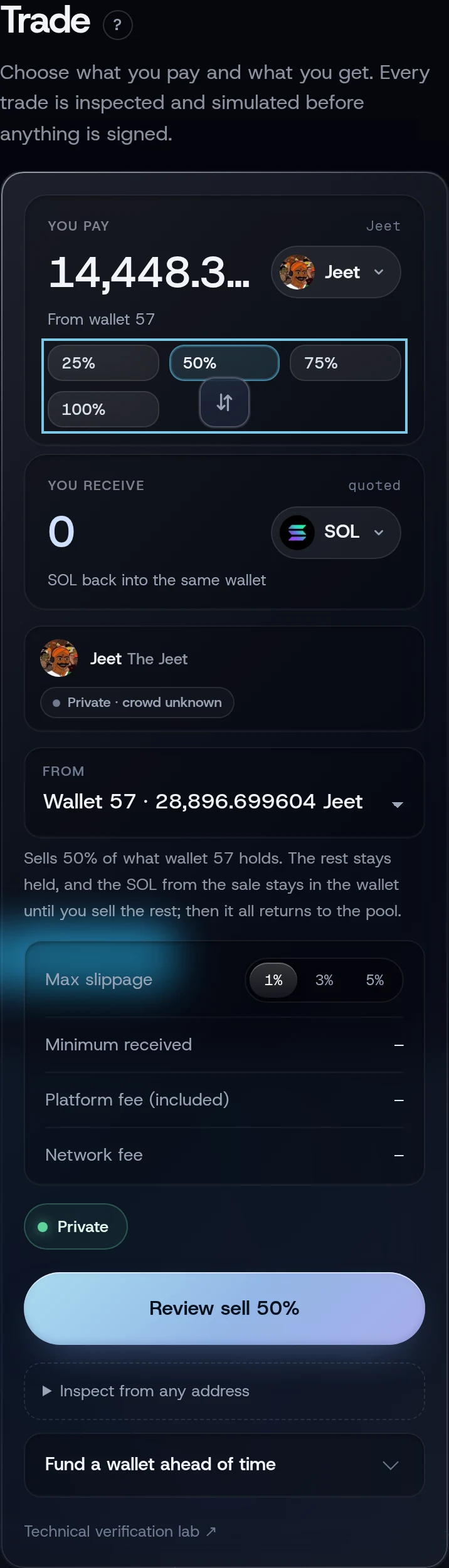
- Open Trade and tap the arrows between the two amounts, so the token is under You pay and SOL under You receive.
- Tap the token button under You pay and choose the token you hold. The wallet that holds it is chosen for you under From.
- 100% is selected. To sell part, tap 25%, 50% or 75%. The field shows the token amount.
- Under Max slippage, keep 1% or choose 3% or 5%.
- Tap Review sell (for 100%) or Review sell 50% (for a part).
- Check the sheet and tap Approve and send.
On Positions, a holding wallet's Review sell all sells the whole position, at the slippage chosen here on Trade. A part sale is on Trade only.
Part or all
The diagram in words
Selling 25, 50 or 75%: the wallet holds fewer tokens, and the SOL from the sale stays in the same wallet. You can sell more later or add to the position.
Selling 100%: the tokens are gone and the SOL returns to your private balance, by itself if automatic return is on. The wallet is then retired.
A partial sale leaves the rest of the tokens and the SOL in the same wallet. The review's last row reads "the SOL waits in this wallet until you review its return to the pool". It returns with the final sale.
A full sale closes the wallet's token account and, with automatic return on, carries the return in the same approval. Its sheet is titled Sell and return to the pool, and its Then row says when:
- on Private · Instant: "everything the wallet holds, less fees returns to the pool right after the sale, with no second approval";
- on other profiles: after a random wait of at least 30 minutes. It runs while WiSP is open; if the app is closed when the time comes, it runs the next time you open it.
Automatic return is on by default. You can switch it off on Privacy; each return then asks for your approval. See Returning SOL to the pool.
The review sheet
| Row | What it tells you |
|---|---|
| You sell | The token amount |
| You receive at least | The least SOL you accept, before and after the platform fee. The network fee also comes out of this wallet |
| Quoted | What the market quotes now |
| Platform fee | WiSP's fee and its rate |
| Kept in the wallet for the exit | 0.0018 SOL |
| Token account | "closed after the sale" for a full sale, "kept open" for a part |
| Then | What happens to the SOL afterwards |
| Venue account | Only on a wallet's first sale on pump.fun or PumpSwap (for example a token bought on the curve and sold after it graduated): up to 0.0025 SOL of the proceeds opens the wallet's account there, once. On a small sale the wallet can end with less SOL than before |
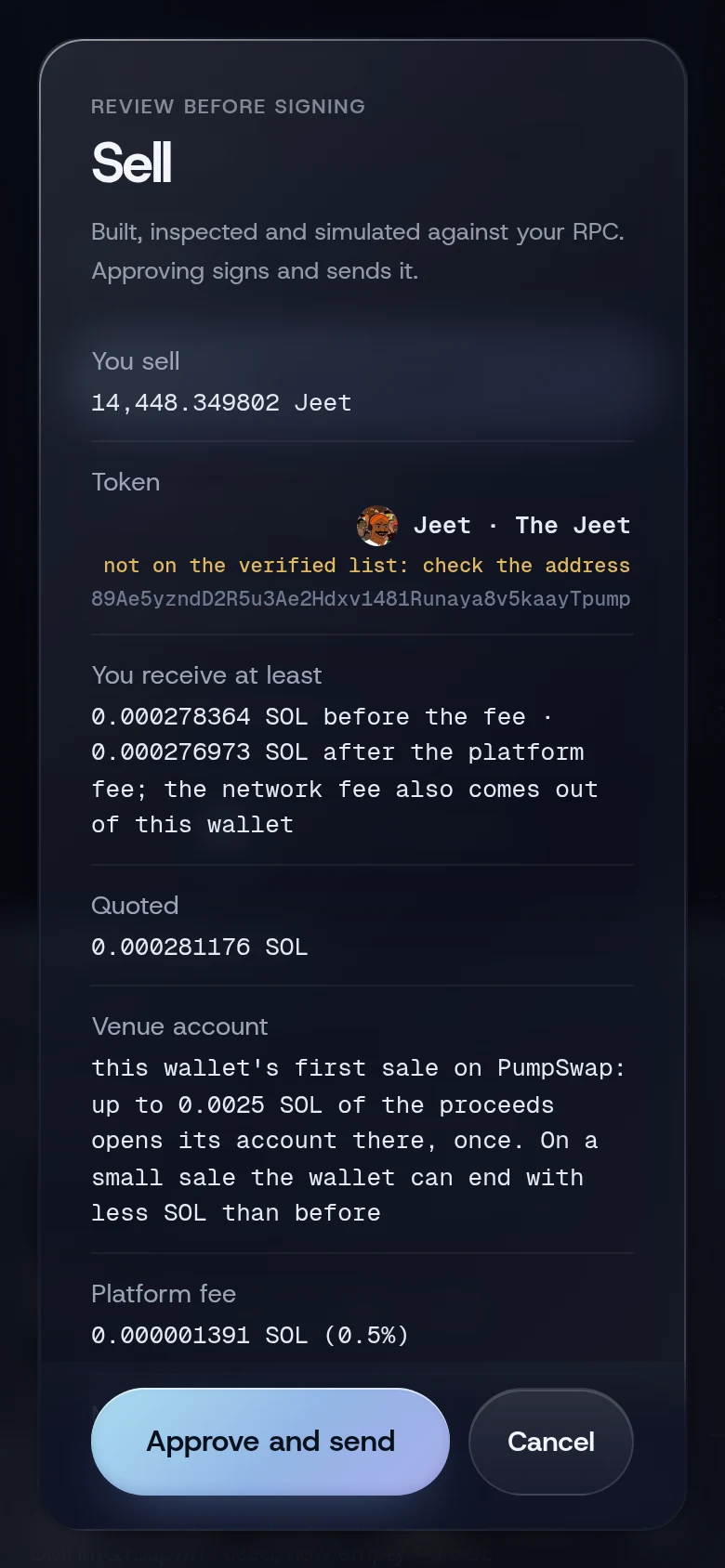
It also shows Token, Max slippage, Speed (on Fast and Faster), Most this wallet can spend, Trades on and Wallet, as on a buy.
What you will see
The toast reads Sold. After a full sale on Private · Instant, a second toast reads Wallet 4 returned to the pool, and the wallet moves to Closed on Positions. On other profiles it shows as PENDING with the time it returns.
If something goes wrong
- "Too soon after the previous private transaction; wait a few slots". Wait a second and review again.
- "Wallet 4 no longer holds its tokens: they were sold or moved elsewhere, in another wallet app or on your other device. Its SOL can return to the pool from Positions". Open Positions and tap Return to pool on that wallet.
- "Wallet 4 no longer holds the token it bought: it was sold or moved elsewhere. It still holds another token; review that sale instead". Choose the other token on Trade and review its sale.
- "No route for this token right now", or the sale fails because the token has no market left. Positions then offers Return the SOL, leave the tokens. See Returning SOL to the pool.
- "This trade is too large for the speed setting; use Standard". Open Terminal, set the speed menu to Speed: Standard, then come back to Trade and review again.
More on When something goes wrong.
Related
Last checked against the app: 24 October 2026, build bf09a3f