
The terminal
Filter a column and set its buy amount
Each terminal column has its own filters and its own buy amount. Both are kept in this browser only.
This page is in English.
Set a column's buy amount
At the top of each column, the box with a ⚡ holds the SOL each Buy in that column spends. It starts at 0.1 SOL in every column. Type a new amount; the Buy buttons in that column change to match, for example ⚡ 0.25.
Clear the box to make the buttons read Buy instead. A tap then opens Trade for review, even with Quick buy on, with the amount box on Trade empty: type the amount there before you review. An amount from an earlier trade is not carried over.
Filter a column
- Tap the filter button at the top of a column. The form opens under it.
- Fill in any of the fields. Cards that do not match disappear at once.
- Tap the filter button again to close the form. It stays highlighted while any filter is set.
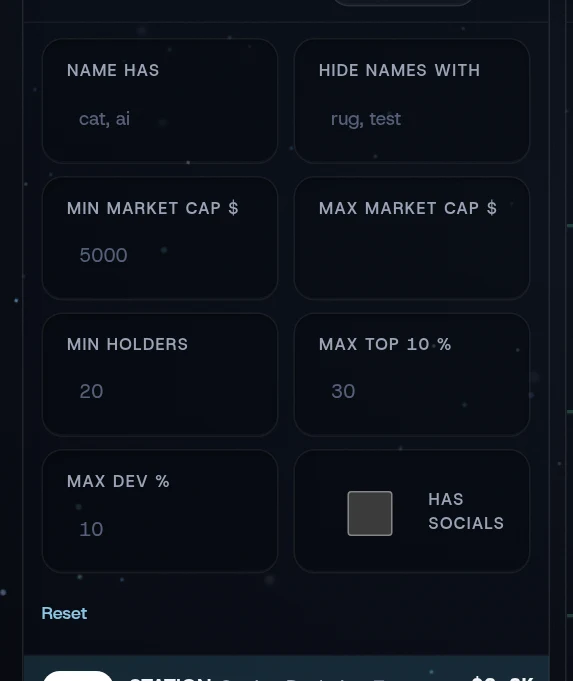
| Field | What it does |
|---|---|
| Name has | Show only tokens whose name or ticker contains one of these words. Separate words with commas, such as cat, ai |
| Hide names with | Hide tokens whose name or ticker contains one of these words, such as rug, test |
| Min market cap $ | Hide tokens below this market cap. A token with no market cap yet counts as $0 |
| Max market cap $ | Hide tokens above this market cap |
| Min holders | Hide tokens with fewer holders. Unknown counts as 0 |
| Max top 10 % | Hide tokens whose ten largest holders hold more than this. Unknown passes |
| Max dev % | Hide tokens whose dev holds more than this. Unknown passes |
| Has socials | Show only tokens with an X account, a website or a Telegram link |
The grey text in each field is an example, not a default. All filters start empty. Reset clears that column's filters.
Where these settings live
Filters, buy amounts, the sound choices and the phone tab are saved in this browser's storage, not in your account. They do not reach WiSP's server, and they do not follow you to another device. In a private window they last only for that visit.
Related
Last checked against the app: 24 October 2026, build bf09a3f