
Account and keys
Back up and restore your account
Your recovery phrase rebuilds the account from the chain on any device. An encrypted backup file also keeps work that was still in progress.
This page is in English.
On this page
The diagram in words
From the phrase the app derives your pool identity and your wallets. With the pool identity it finds your notes in the pool, which add up to your private balance. With the wallet keys it reads each wallet on chain, finds the positions and their tokens, and stops after 20 unused wallets in a row.
The phrase does not bring back what lives only on the device: work still waiting for the chain's answer, what each position cost, and the device's own settings such as the RPC, the privacy profile and the access notice.
Two ways back in
| Recovery phrase | Encrypted backup file | |
|---|---|---|
| What it holds | The 24 words | The phrase, your positions with their costs, your privacy profile and automatic return setting, and work in progress, sealed under your password |
| Restores | Balance and wallets, read again from the chain | The account as it was when you saved it, except the RPC and the access notice, which belong to the browser |
| Needs | Nothing else | The password the file was saved under |
| Keeps what each position cost | No | Yes |
Keep the phrase in all cases. Export a backup file now and then if you want your trade history and costs to survive a new browser.
On Keys, the tip Phrase or backup file: which one do I need? says the same, and adds: "Import a backup from the welcome screen. To use two devices, link the second one from Keys → Link another device." A backup file is for a browser with no account in it; to run the same account on a second device at once, link it instead.
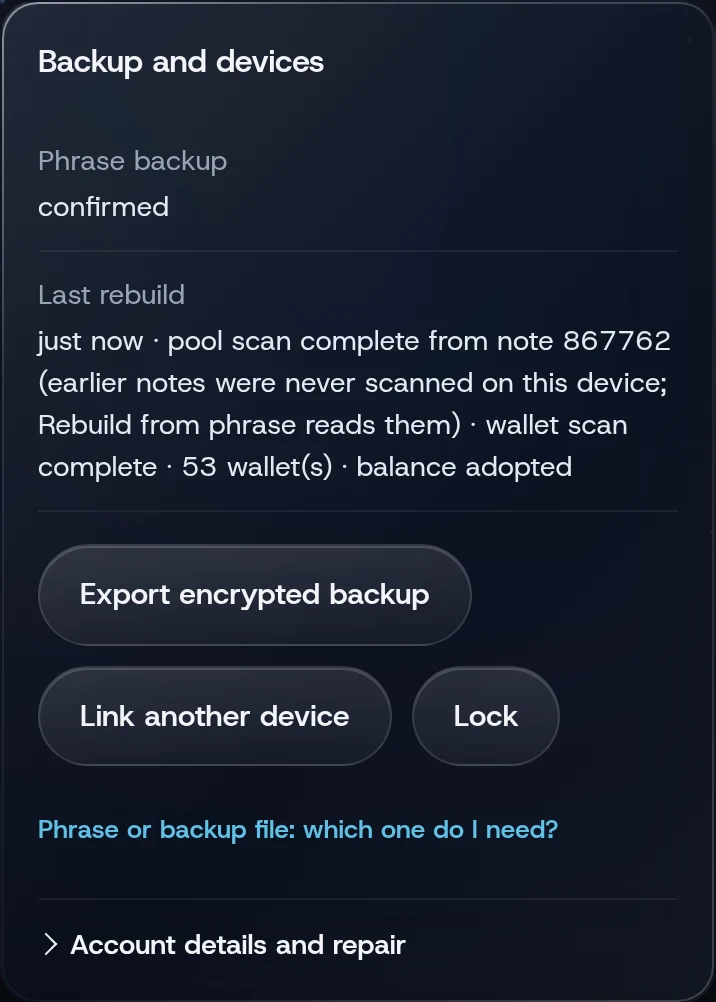
Export an encrypted backup
- Open Keys (under More).
- Tap Export encrypted backup.
On a computer the file downloads as wisp-account-backup.json. On a phone the share sheet opens. The file is sealed under your current password; anyone who has both the file and the password has the account, so guard it like the phrase.
Restore from your phrase
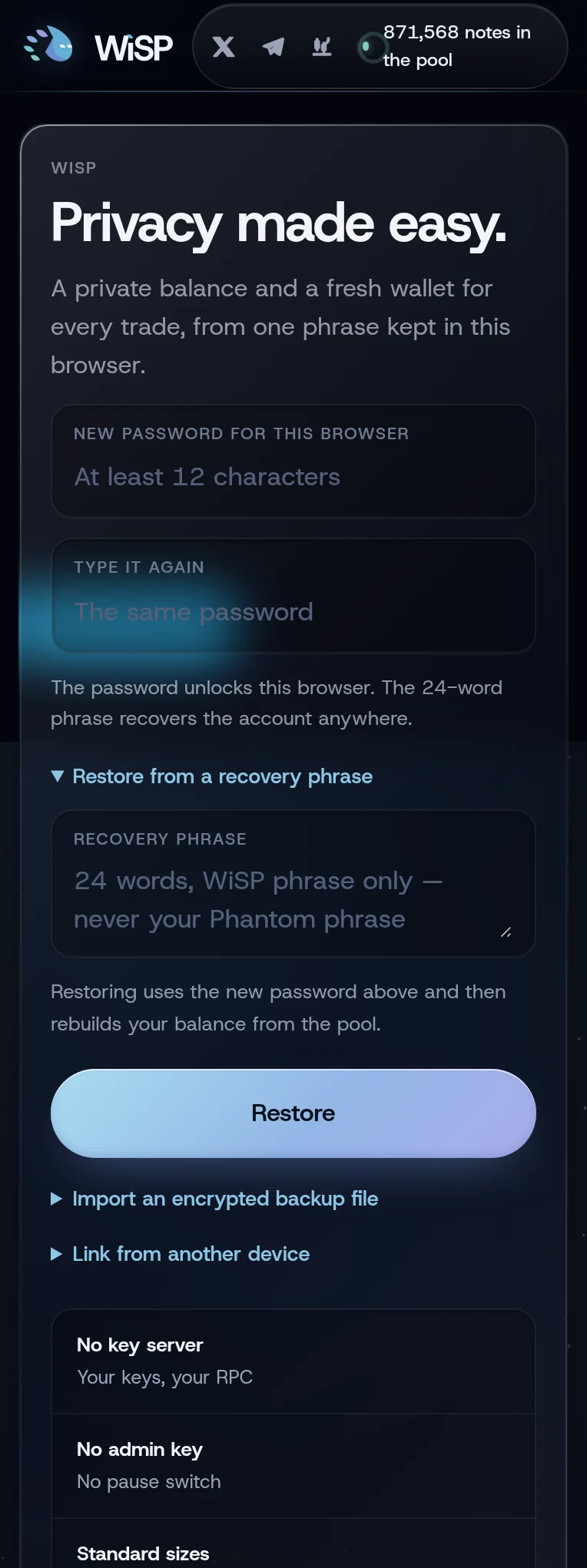
This works only in a browser with no WiSP account in it.
- On the welcome screen, open Restore from a recovery phrase.
- Type a new password for this browser, twice. At least 12 characters.
- Type or paste your 24 words under Recovery phrase.
- Tap Restore.
The app then reads the pool and the chain: Rebuilding your account…, with a count of notes read. Keep the screen open. Reading the whole pool takes from under half a minute to a couple of minutes, depending on your RPC and your computer (October 2026). The toast then reads, for example, Account restored · 1.2 SOL private, 3 trading wallets found.
If the rebuild could not finish, the toast says Restored. The rebuild is not finished; continue it from Keys. Open Keys, then Account details and repair, and tap Continue rebuild.
Import a backup file
- On the welcome screen, open Import an encrypted backup file.
- Choose the file under Backup file.
- In the field labelled The password this backup was saved under, type that password. It also becomes this browser's password.
- Tap Import backup.
The toast reads Backup imported. Refresh to reconcile anything that was pending when it was saved. Tap the refresh button next to Private balance on Home.
Rebuild from your phrase on this device
If balances look wrong, open Keys, then Account details and repair, and tap Rebuild from phrase. It reads the whole pool again from the start, using the phrase already in this browser. Nothing is signed or sent.
If Last rebuild on Keys says "wallet scan incomplete", some of your trading wallets have not been read yet, for example after a read failed. The button then reads Continue rebuild. Tap it; the rebuild continues where it stopped.
What a phrase restore cannot recover
- What each position cost. A position found by a rebuild shows "Rebuilt from the chain: what this wallet cost is not recorded here." and a RECOVERED chip. Its P&L stays empty, and the portfolio counts it under "wallets without a recorded cost".
- Work in progress. A transaction that was sent but not yet answered by the chain lives only on the device that sent it, and in backup files.
- Settings. Your privacy profile and automatic return setting come back with a backup file but not with the phrase. The RPC and the access notice are set again in each browser either way.
If something goes wrong
- "A WiSP recovery phrase has 24 words" or "Invalid recovery phrase". Check each word and the order.
- "An account already exists in this browser. Use a clean profile to restore another phrase." Restore in another browser or browser profile. To remove the account here instead, lock it and use Forgot your password? Remove this account from this browser on the welcome screen (how).
- "Wrong password or damaged backup" on import. Use the password the file was saved under.
- "The default RPC refused the request (HTTP 403)…" or "The default RPC is busy right now." Wait a minute, or choose another RPC and tap Rebuild from phrase on Keys.
More on When something goes wrong.
Related
Last checked against the app: 24 October 2026, build bf09a3f