
Positions and history
Read the Activity screen
Activity lists every transaction and its state. When one has no answer from the chain yet, refresh it; never send it again.
This page is in English.
On this page
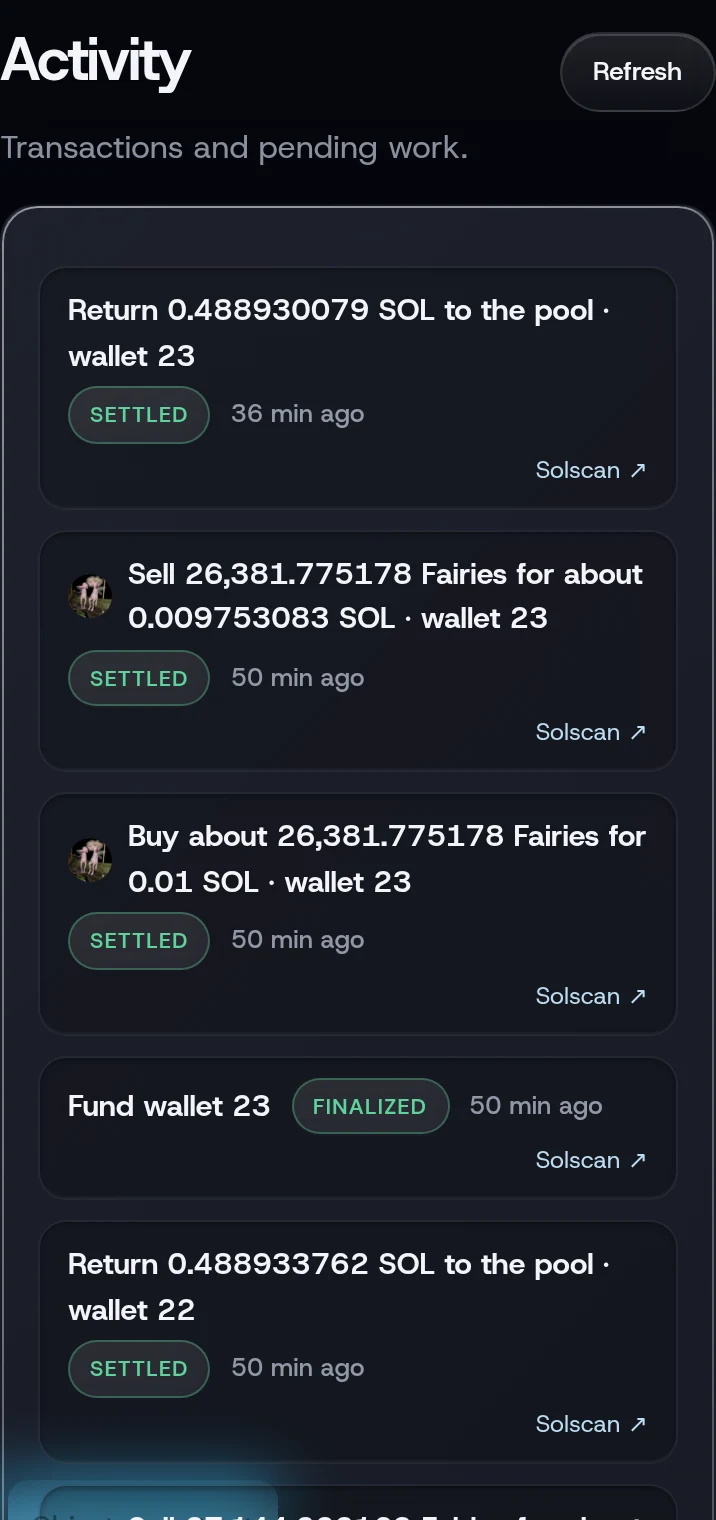
Open Activity (under More). It shows "Transactions and pending work." Each row has a title such as "Buy about 1.2M ABC for 0.5 SOL · wallet 3", a state chip, its age, and a Solscan ↗ link. A pool withdrawal to your own wallet reads "Withdraw 0.5 SOL to your wallet"; the pool withdrawal of a move to another chain names the asset instead, such as "Leave 0.5 SOL to ZEC".
The states
| Chip | What it means |
|---|---|
| PREPARED | built, not yet signed |
| SIGNED | signed, not yet sent |
| SUBMITTING | sent; outcome not known yet |
| UNKNOWN | sent; the chain has not answered yet. Refresh asks again |
| CONFIRMED | on chain; not yet settled locally |
| CANCELED | never executed; released |
| CONFLICTED | your other device used this balance first; nothing moved |
| FAILED | rejected by the chain; nothing moved |
| EXPIRED-UNRESOLVED | its blockhash expired before the chain answered; Release after expiry checks two RPCs and frees it |
| RELEASED-EXPIRED | released: two RPCs showed nothing landed; a late landing is still watched for |
| RELEASED | released: its proof left the pool’s history without landing; nothing moved |
Finished transactions show their chip with no note.
When a transaction is unresolved
Sometimes the chain has not answered by the time the app stops waiting. Home then says "One action is still waiting for Solana's answer." with a Refresh button.
Refresh. Do not send it again. The transaction may still land, and sending a second one could do the same thing twice. Tap Refresh on Home or Activity; the app asks the chain again and settles the row. Unlocking the app also refreshes.
Cancel unsent appears when something was built but never signed. It cancels those; nothing had been signed.
Release a transaction that can no longer land
A Solana transaction is only valid for about a minute. Once that has passed, a transaction WiSP sent can never execute, but the app keeps its SOL reserved until it is sure. While one is reserved, new funding and withdrawals wait. After 15 minutes, Home shows a Release button that opens this check.
The button also appears on a pool withdrawal (a funding, a withdrawal or a move to another chain) that is still SUBMITTING or UNKNOWN. For those, both RPCs must show that the withdrawal's proof has left the pool's recent history and that its notes were not spent; the row then reads RELEASED.
- On Activity, tap Release after expiry on the row.
- The sheet Confirm nothing landed has a Second RPC field. When it says Optional, leave it empty and the app uses WiSP's check provider. Otherwise, paste the address of an RPC from a different provider than yours, with your own key (see Use your own RPC for the allowed hosts). Solana's public RPC (
api.mainnet-beta.solana.com) refuses requests from websites, so it does not work here. - Tap Check and release.
Both RPCs must show that nothing landed. Then the toast reads Released: both RPCs show nothing landed, so the reservation is free. A late landing is still watched for.
A transaction your own wallet sent, such as a shield from Phantom, may still land later if the wallet refreshed it, so the app keeps watching it after a release.
If something goes wrong
- "Release needs a second RPC on a different host from yours". Use another provider.
- "The second RPC refused the request (HTTP 403)". That provider would not answer the page. Nothing changed. Use one where you have your own key, or leave the field empty when it says Optional.
- "Insufficient expiry evidence for release". The transaction expired too recently. Wait a minute and try again.
- "Signature is known to the network; reconcile instead of releasing". It did reach the network. Tap Refresh instead.
- "Release evidence lags the chain; try again". One RPC is behind.
- "The proof root is still in the pool history; the relayer may still submit it". A pool withdrawal can still land. Wait a few minutes, tap Refresh, then try again.
- "The withdrawal notes were spent on chain; reconcile instead of releasing". It landed. Tap Refresh instead.
More on When something goes wrong.
Related
Last checked against the app: 25 October 2026, build bf09a3f