
The terminal
Quick buy: one-tap buys
Set your limits once, and each Buy on a terminal card goes out from a ready wallet with no review. It stays inside those limits and ends when you lock or close WiSP.
This page is in English.
Quick buy is a standing permission you give the app for a while: buy from a ready wallet when you tap, without opening a review each time, but never outside the limits you set. While it is on, the app keeps a few ready wallets loaded from your private balance so a tap does not have to wait for the pool.
The diagram in words
Your private balance loads one ready wallet at a time, each paying the pool's withdrawal fee. You keep 1 to 5 ready, at the size you choose. A tap on Buy on a card buys from one, with no review, inside your limits. The next can load from 2 to 8 seconds after the last one started on Private · Instant, or 20 to 60 seconds on other profiles. An unused ready wallet can go back to the pool from Positions.
Turn it on
- Open Terminal. The bar in the header reads Quick buy off. Tap Turn on.
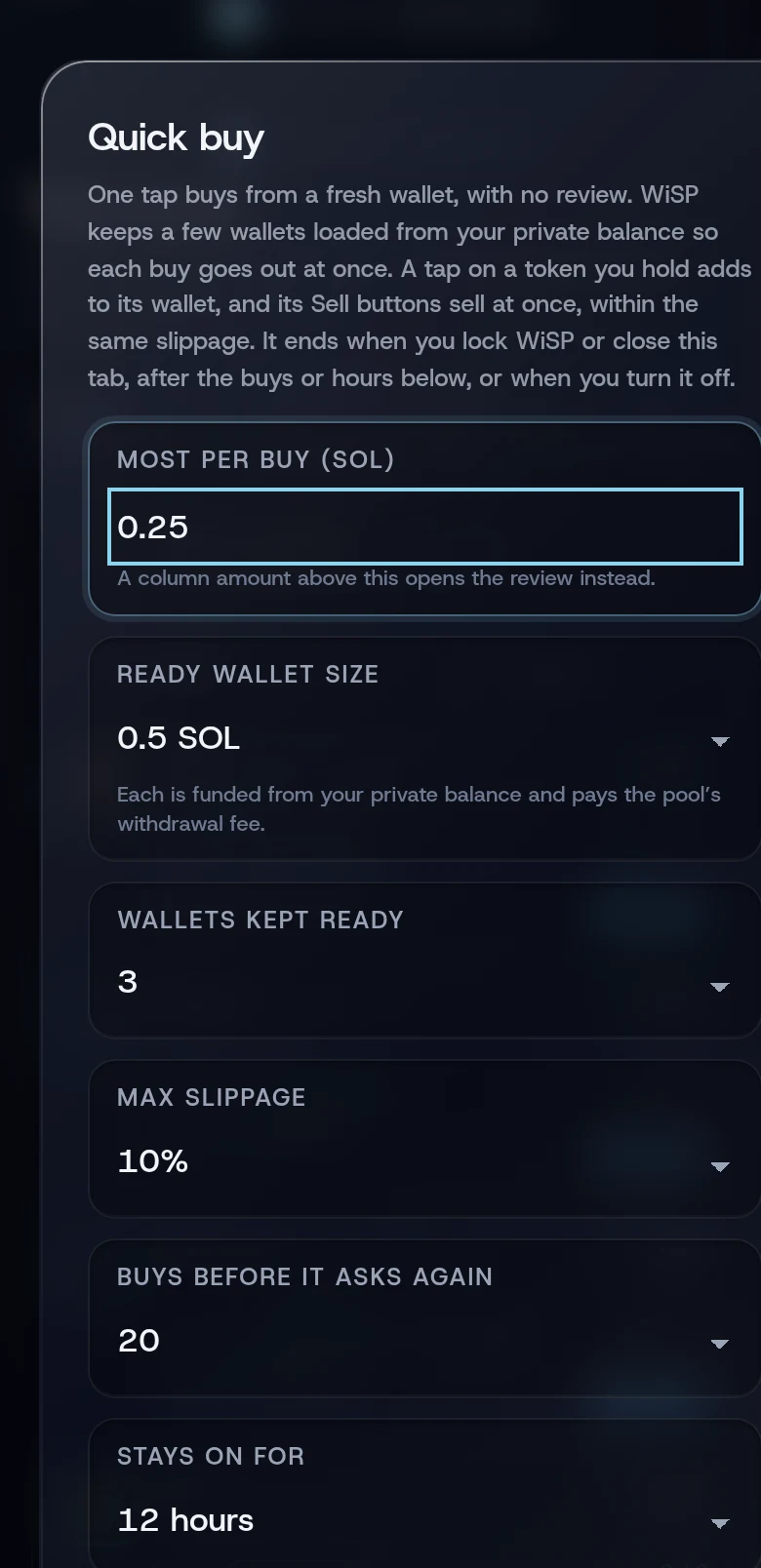
Fill in the sheet:
Setting Choices Starts at Most per buy (SOL) Any amount. A column amount above it opens the review instead 0.25 Ready wallet size 0.5, 1, 2 or 3 SOL 0.5 SOL Wallets kept ready 1 to 5 3 Max slippage 3%, 5% or 10% 10% Buys before it asks again 5, 10, 20 or 50 20 Stays on for 1, 6, 12 or 24 hours 12 hours - Read the line under the settings. It checks your private balance against the wallets you asked for: "loads all 3 ready wallets", "loads 1 of 3 ready wallets now; the rest load after you shield more", or "not enough for one 0.5 SOL wallet".
- Tap Turn on Quick buy.
The toast reads Quick buy is on. Loading your ready wallets… and the bar changes to something like Quick buy on · 3/3 ready · up to 0.25 SOL · 20 buys · 12h.
The most per buy must leave room in a ready wallet: the pool fee comes out of the wallet's size, 0.0025 SOL stays for the sale, and 0.05 SOL covers the buy's fees. So the most per buy is at most 0.4475 SOL for a 0.5 SOL wallet, 0.9475 for 1 SOL, 1.9475 for 2 SOL and 2.9475 for 3 SOL.
Quick buys skip the review, so the slippage you choose here applies to every one of them. The default is 10%: on a fast-moving launch you may pay up to that much more than the price you saw.
Use it
Tap Buy (shown as ⚡ and the column's amount) on any card. The toast reads "Buying $ABC with 0.1 SOL…", then "Bought $ABC with 0.1 SOL" followed by the seconds since your tap.
- A token you already hold: the tap adds to the wallet that holds it, using that wallet's SOL.
- A held card: its Sell 25%, Sell 50% and Sell 100% buttons sell at once, within the same slippage. You get three quick sells for each buy you allowed; they are an allowance of their own and outlast the buys.
- Outside your limits: if the amount is above your most per buy, the wallet changed since it was funded, or the buy no longer fits, the toast names the reason and adds "Opening the review." Then Trade opens with the buy for you to review.
See Buying and selling from a card for every case.
When it ends
Quick buy stops when any of these happens:
- you tap Turn off on the bar. The toast reads Quick buy is off. Every buy asks for review again.
- you lock WiSP, reload the page or close the tab. A phone that puts the page to sleep pauses refills until you come back;
- the hours you chose run out;
- you have used both the buys and the quick sells you allowed.
When the buys are used up
Using the last buy does not end the session. Quick sells go on until their own allowance ends, so the positions the session opened can still be sold with one tap. From then on:
- a card's Buy and the token page's Buy open the review on Trade, and the token page's note reads "Opens the review. Turn on Quick buy on the board for one tap.";
- the bar reads something like Quick buy on · 3/3 ready · up to 0.25 SOL · buys used · 42 sells · 9h.
To buy with one tap again, tap Turn off, then Turn on with new limits.
Ready wallets that are already loaded stay funded. Use them on Trade, or return them to the pool from Positions.
If something goes wrong
- "Your next ready wallet is loading; a few seconds" or "No ready wallet yet; one is being loaded". Tap again in a moment.
- "That amount is above your Quick buy limit". Lower the column amount, or raise the most per buy.
- "Quick buy has ended; turn it on again". The hours ran out.
- "Quick buys for this session are used up; review the buy". The buy opens on Trade; quick sells still work.
- "Quick sells for this session are used up; review the sale". The sale opens on Trade.
- The bar says "needs 0.5 SOL private to load more". Your private balance is below one ready wallet's size. Shield more.
Once the quick sells are used too, the session ends and the card's Sell buttons open the review instead. Refills also wait while your privacy profile's funding wait after a deposit is running.
More on When something goes wrong.
Related
Last checked against the app: 24 October 2026, build bf09a3f