
Trading
Fund a wallet now, buy later
Fund a fresh wallet from the pool before you know what to buy. Later the buy goes out at once, and more time separates it from the funding.
This page is in English.
On this page
Why fund ahead
- Speed. A buy from a funded wallet skips the pool withdrawal and its proof, so it goes out at once.
- Distance. The longer a wallet waits between its funding and its first buy, the harder the two are to pair by time.
- Slow profiles. On Private · Steady or Private · Max, funding waits after each deposit. A wallet funded earlier is ready when you need it.
Steps
- Open Trade. Under From, choose A new wallet, funded now from your private balance.
- Tap a size under You pay.
- Tap Fund only · buy $WiSP later. The button names the token on screen, so it reads Fund only · buy $ABC later once you pick $ABC.
- Check the sheet, titled Fund a fresh wallet, and tap Approve and send.
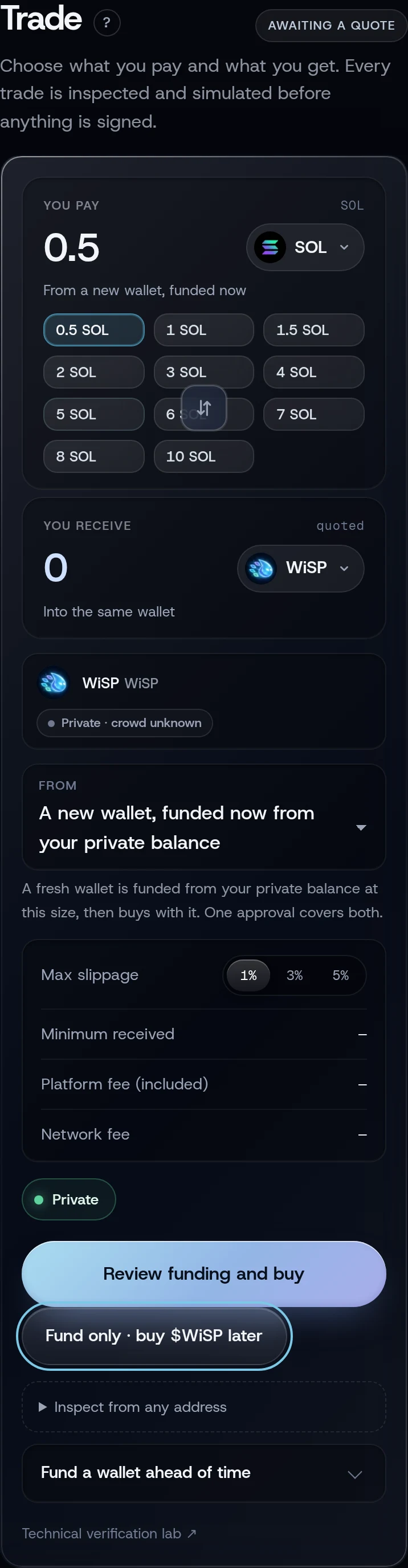
What you will see
The toast reads Wallet funded with the signature. On Positions, a wallet with no token shows as READY; one set aside for a token shows as FUNDED. Home counts them under Ready wallets.
Buy from it later
- On Trade, choose the token. A ready wallet is chosen for you, shown as "Wallet 5 · 0.5 SOL · ready, buys at once".
- Tap Review buy and approve.
A wallet set aside for one token can only buy that token. Positions also has a Review buy button on a funded wallet.
Change your mind
On Positions, expand the wallet and tap Return to the pool. An unused wallet can go back at once.
If something goes wrong
- "Fund only · buy $WiSP later · opens in 12 min". Your privacy profile's wait is running.
- "Your private balance no longer covers this size; choose a smaller one or shield more". Your balance changed after the screen read it (a trade on another device, for example). The sizes update; pick a smaller one, or shield more.
Related
Last checked against the app: 24 October 2026, build bf09a3f