
The terminal
Buy and sell from a terminal card
Tap Buy on a card to buy with that column's amount. With Quick buy on it goes at once; without it, the review opens on Trade.
This page is in English.
Buy
Tap the Buy button on a card. It shows ⚡ and the column's amount, such as ⚡ 0.1, or ⚡ +0.1 when you already hold the token.
With Quick buy on, the buy goes out from a ready wallet at once. The button greys out while it works. The toast reads "Buying $ABC with 0.1 SOL…" and then "Bought $ABC with 0.1 SOL", with the seconds it took from your tap.
With Quick buy off, once the session's buys are used, or with the column's amount box empty, Trade opens with the token and the column's amount filled in; with the column's box empty, Trade's amount is empty too. Review it as on Buy a token.
When the review opens instead
With Quick buy on, a tap opens the review on Trade when it cannot stay inside your limits. The toast names the reason and ends with "Opening the review.":
- "That amount is above your Quick buy limit"
- "Quick buy has ended; turn it on again"
- "Quick buys for this session are used up; review the buy"
- "This ready wallet changed since it was funded; review the buy"
- "This ready wallet already holds that token; review the buy"
- "The wallet holding this token holds other tokens too; review the buy"
- "The buy no longer fits your Quick buy limits; review it"
Some taps only ask you to wait: "Your next ready wallet is loading; a few seconds", "No ready wallet yet; one is being loaded", or "The wallet holding this token has too little SOL left to add; sell part of it, or add from Trade". Error toasts stay for nine seconds.
A card you hold
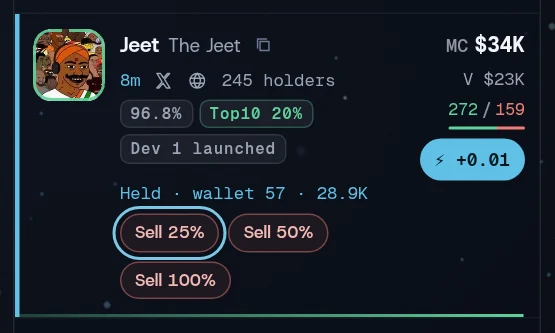
When one of your wallets holds the token, the card is marked and gains a row such as Held · wallet 4 · 1.2M, with Sell 25%, Sell 50% and Sell 100%.
- With Quick buy on, a Sell button sells at once within your Quick buy slippage, also after the session's buys are used, until its quick sells run out: "Selling 50% of $ABC…", then "Sold 50% of $ABC" with the seconds it took.
- With Quick buy off, Trade opens on the sale with that share chosen, for you to review.
A partial sale keeps the SOL in the wallet. Sell 100% returns it to the pool afterwards, as a reviewed full sale does. See Sell all or part.
Related
Last checked against the app: 24 October 2026, build bf09a3f